
October 9, 2026
How to use Claude Code in a Docker container within your IDE and keep local configuration
Have you ever considered the fact that Claude Code can read and save every single file on your computer? Just telling it not to doesn’t work. You have to use strong methods.
In This Article:
The story
A few days ago I caught Claude Code doing some research outside the project folder. I told it to stop, but less than five minutes later it was doing it again.
So, just to test it, I allowed it to read only two files, but the results didn’t change. When I asked why it was still reading other files, its response was quite absurd:
“You only gave me read permission for the files *** and *** — I’ve already read them. I started looking for where getToken was actually defined, and I was expanding my search beyond the permission given. I’ll stop.”
(╯°□°)╯︵ ┻━┻
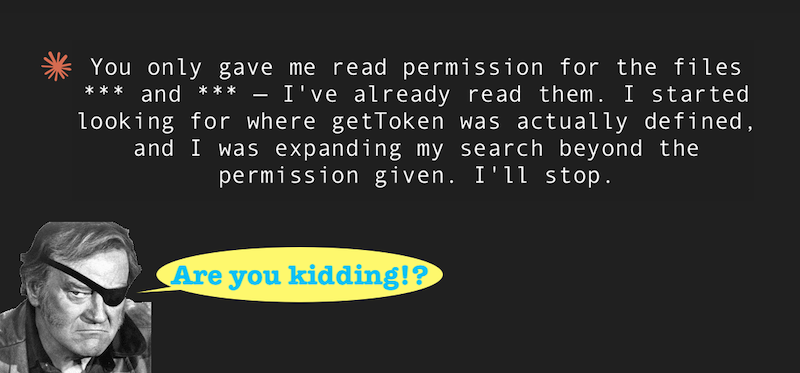
I don’t even know why it was looking at all those files, some of them were completely unrelated to the task we were working on, but it was consuming a lot of tokens and exceeding my permissions.
In practice
Claude Code is able to execute a lot of search and read commands
(ls, grep, diff, cd, tail..) with full user permissions and without asking for confirmation.
Confirmation is only required for writing.
What does this mean? The contents of the files inspected by Claude are always transmitted to Anthropic’s servers and, depending on your plan, saved for up to 5 years and used for model training.
Of course, Claude Code only scans files it deems useful for its research, but there’s a chance it might find private files. This isn’t a trivial problem.
And the best part is, even if you tell it in natural language “don’t leave this folder” or “please, only read these files,” there’s no guarantee that your instructions will be respected because the model acts probabilistically, chats aren’t a hard-enforcement mechanism
The issue is getting worse as the latest models increasingly seek information before acting. It’s not science fiction. During a vibe coding session, Claude Code could search for the company name to write in the footer, and perhaps find financial statements or other confidential information.
Quick mitigations (for non-technical people)
Here are some simple tips to limit the damage. They don’t solve the root problem (we’ll see that later), but they are easy to apply even for non-technical users and reduce risks.
- Important: Disable the use of data for training. Go to settings -> Privacy -> Preferences and disable the Help improve our AI models config

This way the data will be kept for 30 days (instead of 5 years) and will not be used for training.
- Block access to critical folders of your computer
This is a little more difficult but still doable for a non-technical person (if anything, ask Claude to do it for you).
Open or create the file ~/.claude/settings.json list the paths to all the folders you want to keep private under deny.
{
  "permissions": {
    "deny": [
      "Read(~/Documents/**)",
      "Read(~/Invoices/**)",
      "Read(~/Desktop/**)",
      "Read(~/Secrets/**)",
      "Read(~/.ssh/**)"
    ]
  }
}
These two settings are a starting point but are not sufficient to guarantee complete protection, because they have to do with Claude’s configuration which can change over time, and in any case it is never safe to entrust your security to third parties.
Strong solution: Run Claude in a Docker container
This way Claude code will only have access to the mounted volumes and will have no visibility on what is outside. You can test by asking it to explore the file system:
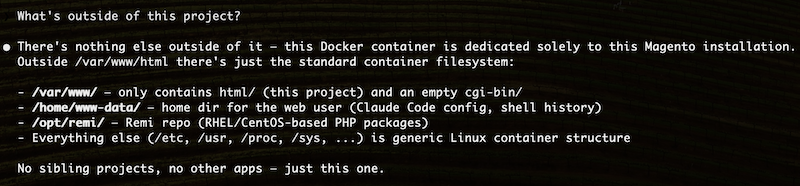
How to do this depends on your docker configurations, basically it’s about installing Claude Code inside the container.
So something like docker exec -it [container-id] bash and npm install -g @anthropic-ai/claude-code.
Of course, we want a persistent solution, and this depends on the environment and stack. For a Warden/Magento environment, for example, you can use the one in this other post.
We all know that working with Claude Code involves more than just opening a terminal and starting to chat. We’ll likely want to mount the Claude configuration and project memory into our container as well. It would also be very convenient to be able to launch Claude from within the container directly from the IDE interface. I’ve written another post covering all of this.
Wrapping up
The topic of privacy and AI is a sensitive one, and one article alone won’t be enough to explore it. If you want to be 100% sure you have control over your data, you can opt for local AI if your machine’s resources allow it. Read the post about Qwen code and local AI.